
Understand how GST state codes work, how to find your code by GSTIN, and what mistakes to avoid during GST registration.
Authored By FlexiLoans | Date: 08/01/2026
- Quick Summary
- What: A 2-digit code that identifies the state or union territory in your GSTIN.
- Why: Ensures correct tax filing and avoids GST registration errors.
- Who: All GST-registered businesses must use it.
- How: It’s assigned based on your business address during registration. You can also find it using the GST portal.
- Use Case: Needed for GST filings, invoices, and loan applications. Wrong codes can lead to rejections or delays.
Introduction
Every state and union territory in India is subjected to GST on the supply of goods and services. Today, more than 1.45 crore businesses are registered under GST. To manage all these businesses, the government uses a special code called the GST State Code.
Every Indian state and union territory has its own GST code, like 27 for Maharashtra or 09 for Uttar Pradesh. This code is the first two digits of your 15-digit GSTIN (Goods and Services Tax Identification Number). It tells the government that your business belongs to which state.
If the state code is wrong, your registration or tax filing may fail. It is useful for businesses to identify their correct GST State Code. It ensures smooth GST registration in India, accurate tax filing, and compliance with GST rules. Learn the purpose of GST State Codes, view the full list, know how to find your GST code, and get a simple step-by-step guide on how to apply for GST.
What is the GST State Code?
The GST state code is a unique code allocated to every state and union territory in India for GST registration and compliance. The first 2 digits of a 15-character GSTIN represent the GST state code, where your business is registered. So, if your GSTIN starts with 07, it means your business is registered in Delhi.
Before GST was introduced in 2017, businesses had to register under different tax systems. For instance, they obtain a TIN (Taxpayer Identification Number) from their state government under the VAT law. Similarly, service providers obtain a Service Tax number from the Central Board of Indirect Taxes and Customs (CBIC).
After GST came into effect, both business and service ventures got a unique number called the GSTIN (Goods and Services Tax Identification Number). This number is used to track taxes, file returns, and do all GST-related work. Here’s how a GSTIN looks:
- 27ABCDE1234F1Z5
The breakdown can be understood as follows:
- 27: State code
- ABCDE1234F: PAN number
- 1: Entity number (if you have more than one registration in the same state)
- Z: Default alphabet (kept for future use)
- 5: Check code (to validate the GSTIN)
This 2-digits state code is used to track both interstate and intrastate transactions. It also ensures proper tax collection for every state. Digits appearing on invoices also determine where the goods/services are billed from.
List of GST State Codes in India
Knowing a GST state code helps you cross-check your GSTIN or correctly mention the code in invoices and registrations. Whether you are searching for the GST state code for Maharashtra, Gujarat, Delhi, or any other region, here is a GST state code list you can refer to identify your GST state code:
| State/ Union Territory | GST State Code | Union Territory, if included |
| Jammu and Kashmir | 01 | NO |
| Himachal Pradesh | 02 | NO |
| Punjab | 03 | NO |
| Chandigarh | 04 | NO |
| Uttarakhand | 05 | NO |
| Haryana | 06 | NO |
| Delhi | 07 | NO |
| Rajasthan | 08 | NO |
| Uttar Pradesh | 09 | NO |
| Bihar | 10 | NO |
| Sikkim | 11 | NO |
| Arunachal Pradesh | 12 | NO |
| Nagaland | 13 | NO |
| Manipur | 14 | NO |
| Mizoram | 15 | NO |
| Tripura | 16 | NO |
| Meghalaya | 17 | NO |
| Assam | 18 | NO |
| West Bengal | 19 | NO |
| Jharkhand | 20 | NO |
| Odisha | 21 | NO |
| Chhattisgarh | 22 | NO |
| Madhya Pradesh | 23 | NO |
| Gujarat | 24 | NO |
| Maharashtra | 27 | NO |
| Andhra Pradesh | 28 | NO |
| Karnataka | 29 | NO |
| Goa | 30 | NO |
| Lakshadweep | 31 | Yes |
| Kerala | 32 | NO |
| Tamil Nadu | 33 | NO |
| Puducherry | 34 | Yes |
| Andaman & Nicobar Islands | 35 | Yes |
| Telangana | 36 | No |
| Andhra Pradesh | 37 | No |
| Ladakh | 38 | Yes |
| Other Territory | 97 | Yes |
| Centre Jurisdiction | 99 | Yes |
How to Find GST State Code?
It is very helpful to find your GST state code as it helps register your business correctly. It also helps you to file GST returns easily. Read out the methods below to understand how to find the GST state code:
Method 1: Through the CBIC Website
- Visit the official CBIC GST website.
- Go to the ‘Services’ section from the main menu
- Click on ‘Know your Jurisdiction“
- Choose the state from the GST jurisdiction list
- Next, select your zone
- Pick the appropriate commissioner option
- Choose the division your business belongs to
- Now, select your range
- Choose your locality from the list shown
Based on your selection, your business’s jurisdiction and GST state code will be shown.
Method 2: Through the GST Portal
- Go to the GST Portal and log in to your account. If you’re not registered yet, complete the sign-up process from the homepage.
- Once logged in, go to the ‘Search’ section.
- Click on ‘Taxpayer’
- Check the GST state code by entering the GSTIN.
Your business details will appear, including both your State and Central jurisdiction.
Example:
- If your GSTIN starts with 07, it indicates the 07 GST state code, and your business is registered in Delhi.
- If it starts with 27, it falls under the 27 GST state code for Maharashtra.
- If it starts with 09, it falls under the 09 GST state code for Uttar Pradesh.
How to Apply for GST?
In India, the GST application is essential for MSMEs to comply with tax regulations. Here are the conditions under which businesses are obliged to apply GST number:
- Businesses with Turnover Exceeding Thresholds: Businesses supplying goods with an annual turnover over ₹40 lakhs (₹20 lakhs for services) must register. For special category states, the threshold is ₹10 lakhs.
- Inter-State Suppliers: Businesses supplying goods or services across state lines, regardless of turnover.
- E-commerce Sellers: Individuals or entities selling through online platforms like Amazon or Flipkart.
- Casual Taxable Persons: Those conducting seasonal or occasional business activities.
These entities require certain documents to complete GST registration steps. The documents for GST registration include:
- Proof of business registration, such as a partnership deed or an incorporation deed
- PAN Card
- Aadhaar card, passport, or voter ID
- Photographs
- Business address proof, like a rent agreement or utility bill
- Bank account details
Step-by-Step Method on How to Apply for GST Online
Here is the outline of GST registration steps to carry out the process smoothly via the official GST portal:
- Visit the GST Portal: Go to the official website: www.gst.gov.in
- Initiate New Registration: Navigate to ‘Services’ > ‘Registration’ > ‘New Registration’
- Complete Part-A of Form GST REG-01: Now, add your PAN number, mobile number, email ID, and state
- Verify Using OTP: An OTP will be sent to your registered mobile number and email ID. Enter the OTP to validate your contact details.
- Receive Temporary Reference Number (TRN): You will then obtain the TRN. Save the number to complete Part-B of the application.
- Fill Part-B of Form GST REG-01: Log in to your account using the TRN. Add further details on business information and upload required documents.
- Submit the Application: After reviewing all entries carefully, submit your GST application. Apply digitally using Digital Signature Certificate (DSC) or Electronic Verification Code (EVC).
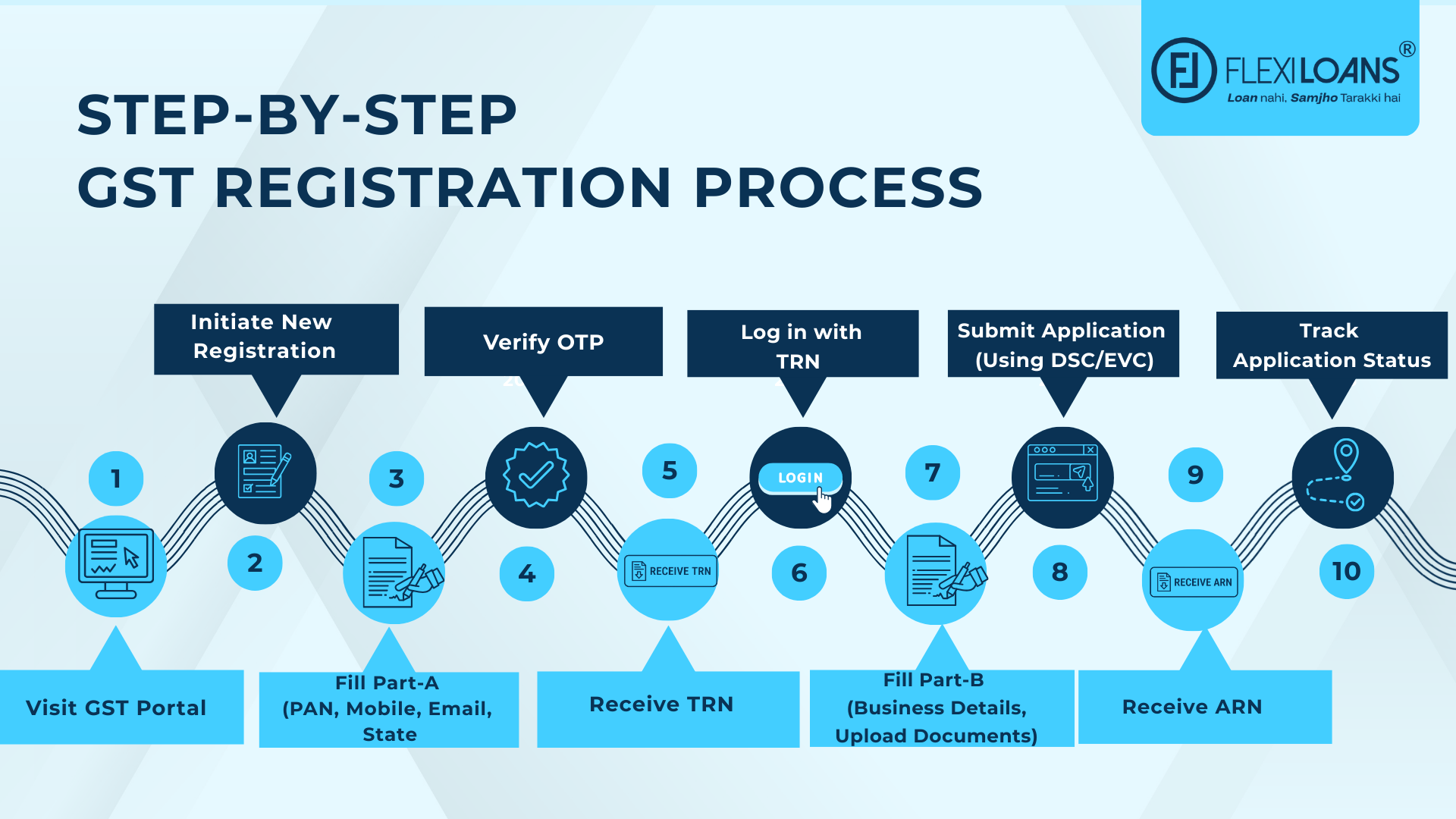
Once you submit the GST application, obtain the Application Reference Number (ARN) immediately. This number is issued to track your application status.
A wrong GST state code can lead to failed registrations, incorrect filings, and tax penalties. Getting it right isn’t just compliance, it’s smart business.
Common Mistakes to Avoid While Applying for GST
Being a small business owner, you must avoid common mistakes while applying for GST. These mistakes can lead to delays and rejections. Here are some key errors to watch out for:
1. Incorrect Selection of GST Category
Choosing the wrong registration type (Regular vs. Composition Scheme) can lead to complications. The regular category comes under a tax mechanism where taxpayers pay and obtain GST on the goods/services value. On the other hand, the GST composition scheme. Ensure that you understand the eligibility criteria for each before selecting.
2. Inaccurate Business Details
GST registration errors in the business name, PAN, or address can cause application rejections. Double-check all information for accuracy and consistency across documents.
3. Blurry or Incorrect Documents
Submitting unclear, wrong, or mismatched documents can lead to GST registration issues, delaying the registration process. Ensure all uploads are legible and correctly labeled.
4. Neglecting to Use Reliable Software
Relying on outdated methods like manual entries or spreadsheets increases the risk of errors. Utilise professional GST software to streamline the process and reduce mistakes.
5. Misclassification of Goods and Services
Using incorrect HSN/SAC codes can lead to tax calculation errors. Verify the correct codes for your products or services before submission.
6. Unable to Verify the Mobile and Email OTP
Neglecting to complete OTP verification can halt the registration process. Ensure you promptly verify both mobile and email OTPs during the application.
8. Delayed Registration Beyond the Mandatory Deadline
Postponing registration after crossing the turnover threshold can result in penalties. Apply for GST registration promptly once eligible.
Conclusion
Knowing how to find the GST state code improves your chances of avoiding rejection and delays in the registration process. If the code is wrong, your GSTIN may be incorrect, and it can cause problems with your bills and tax returns. Proper registration of your business shows that your business is legal and trustworthy. It also helps the government know where your business is located.
When running a small business, GST registration is as important as maintaining a cash flow. If you are running short on cash for growing your business, FlexiLoans offers collateral-free business loans up to ₹50 lakh. Apply for a business or MSME loan now for an interest rate starting at as low as 12%.
FAQs about How To Find GST State Code and Application
Yes, the GST state code must match your business registration address. Any mismatch can lead to GSTIN rejection or delays.
No, you will be unable to apply for GST without a business address. You should essentially have a registered address for your business in order to obtain GST registration in India.
You may need to file a correction or cancel and reapply. The wrong code can lead to invoice mismatches or tax credit issues.
Usually 7–10 working days. The GSTIN will include your state code in the first two digits.
Yes. If your business operates in multiple states, you must register separately in each state and get distinct GSTINs with corresponding state codes.
When you don’t know your business GST state code, you may face rejection during GST registration, delays in tax filing, difficulty in getting GST refunds or credits.
You can stay updated on GST-related regulations and the state code list through government tax portals or by fetching official updates from GSTN.
The GST state code is a 2-digit number representing the state or union territory where your business is registered. It ensures proper jurisdiction, tax tracking, and helps avoid filing errors.
Check the first two digits of your 15-digit GSTIN. That number represents your state code. For example, “27” means Maharashtra.
No. Your GST application will not go through unless the correct GST state code is assigned during registration.
You can verify it on the CBIC portal or by logging in to the official GST portal and using the “Search Taxpayer” tool.
The 07 GST state code is for Delhi, the 09 GST state code is for Uttar Pradesh, and the 27 GST state code is for Maharashtra.
Lenders verify your GSTIN and state code to assess your compliance, registration validity, and business location while processing loan applications.
Glossary: Key Terms Explained
| Term | Definition |
| GSTIN | A 15-digit identification number for GST-registered businesses. The first two digits indicate the GST State Code. |
| GST State Code | A 2-digit number at the start of a GSTIN representing the state or union territory of business registration. |
| CBIC | Central Board of Indirect Taxes and Customs – the authority that governs GST rules and compliance in India. |
| ARN | Application Reference Number generated after submitting the GST registration form. Used to track application status. |
| TRN | Temporary Reference Number issued during the registration process. Allows businesses to complete the application later. |
| Regular vs. Composition Scheme | Two GST registration types. Regular is for normal taxpayers; Composition is for small businesses with lower turnover and simpler tax rules. |
| HSN Code | Harmonized System of Nomenclature code used to classify goods for GST billing and compliance. |
| DSC | Digital Signature Certificate used to authenticate and submit GST forms securely online. |