
Your Easy, Step-by-Step Guide to Accessing Your Official MSME Certificate Online
Authored By FlexiLoans | Date: 03/01/2026
- Quick Summary
- What: A step-by-step guide to downloading your official MSME (Udyam) certificate online
- Why: Critical for accessing MSME benefits like loans, subsidies, and payment protection
- Who: Best suited for registered MSME owners needing digital access or re-download of the certificate
- How: We walk through prerequisites, the Udyam portal login, download steps, and common troubleshooting tips
- Use Case: Ideal for MSMEs applying for funding, verifying registration, or accessing schemes and tenders
Looking to download your MSME (Micro, Small, or Medium Enterprise) certificate? You’re in the right place. This guide will walk you through every step, right from gathering the required details to accessing the official Udyam portal and successfully downloading your certificate. You’ll learn how long the process takes, what documents you’ll need, and how to troubleshoot common hiccups.
By the end, you’ll have your MSME certificate downloaded and ready, helping you unlock benefits like government schemes, collateral-free loans, and regulatory advantages. Let’s begin with the key details you should know before you start.
| What You Need | Details |
| Portal | udyamregistration.gov.in |
| Requirements | 19-digit Registration No. + Aadhaar-linked mobile no. |
| Cost | Free |
| Estimated Time to Download | 2–3 minutes |
| Certificate Validity | No expiry; update if business details change |
What is an MSME Certificate?
An MSME certificate is an official government document issued by the Ministry of Micro, Small and Medium Enterprises (MSME), Government of India, under the MSMED Act, 2006. It formally recognises your business as a Micro, Small, or Medium Enterprise, based on your investment in plant, machinery, or equipment and annual turnover.
Why is the MSME Certificate Important for Your Business?
This certificate isn’t just paperwork; it’s your gateway to a range of benefits designed to support and scale your enterprise. With an MSME certificate, your business gains:
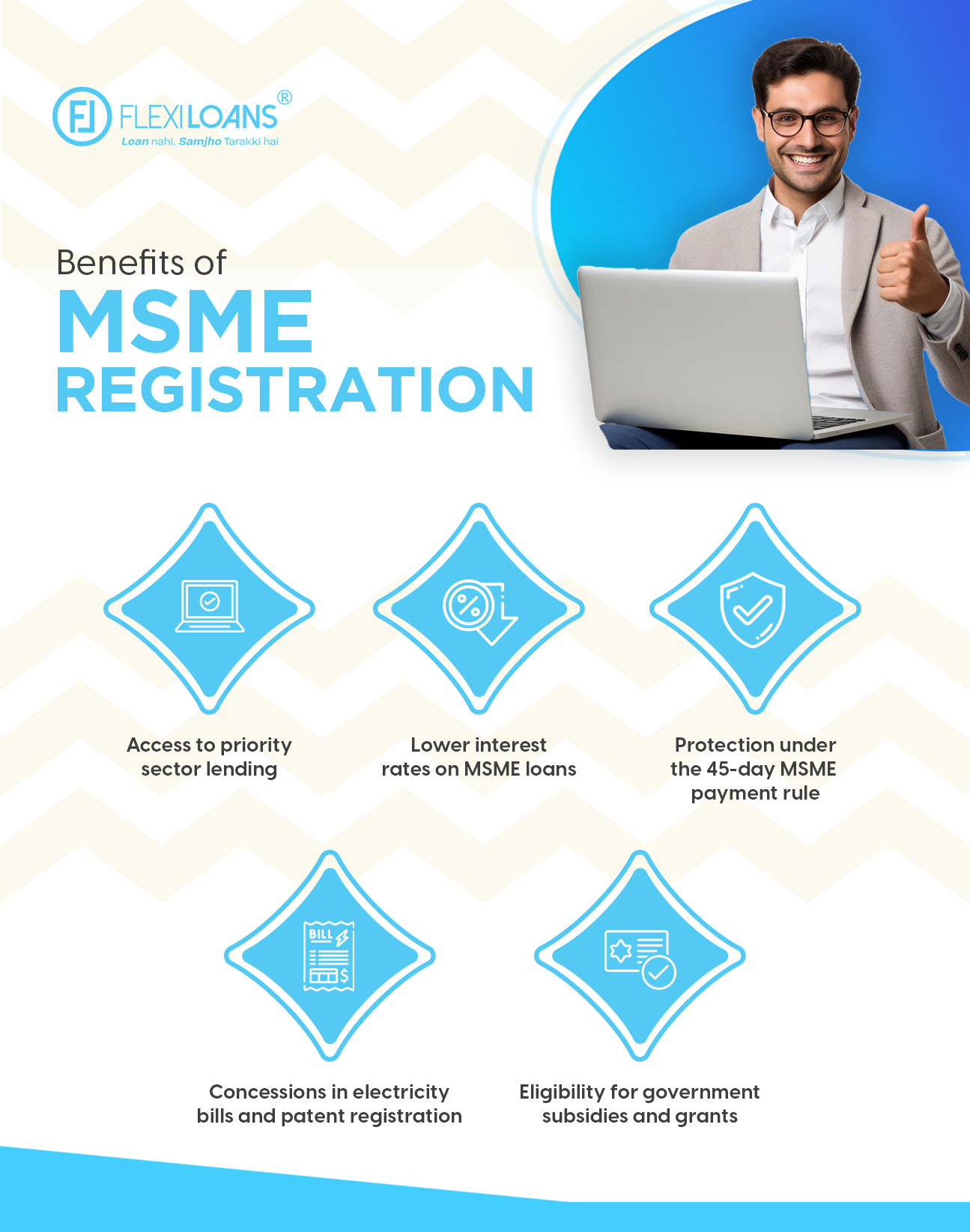
- Access to priority sector lending
- Eligibility for government subsidies and grants
- Protection under the 45-day MSME payment rule
- Concessions in electricity bills and patent registration
- Lower interest rates on MSME loans
Pro Tip: Always keep a digital copy of your MSME certificate ready. It’s frequently required during loan applications and government scheme enrollments.
Who Should Apply for an MSME Certificate?
Any business that falls within the MSME classification, whether a manufacturer, service provider, or trader, can apply for this certificate. It’s particularly useful for:
- First-time entrepreneurs
- Family-run businesses
- Small manufacturers and retailers
- Startups seeking funding
Formal recognition gives you credibility, financial access, and government protection, especially when dealing with corporate clients or lenders.
What is MSME Registration?
MSME registration is the online process of enrolling your business under the MSME framework through the Udyam portal. This free registration process is completely paperless and uses your Aadhaar-linked mobile number and PAN to categorise your business.
Once registered, you’ll receive a Udyam Registration Certificate that is valid indefinitely but should be updated if your business scale or details change.
Step-by-Step Guide: How to Download an MSME Certificate Online
If you’ve completed your MSME (Udyam) registration, downloading your certificate is simple, but many business owners face minor roadblocks. This guide ensures a smooth, error-free download process directly from the government portal.
- Prerequisites Before You Begin
Before you start the download process, ensure you have the following:
1. Udyam Registration Number (e.g., UDYAM-XX-00-0000000)
2. Aadhaar-linked mobile number used during registration
3. PDF reader to open the downloaded file
4. A stable internet connection
Tip: Your mobile number must be linked to your Aadhaar for OTP verification. You can check this at uidai.gov.in.
If you’ve forgotten your Udyam number, use the “Forgot Udyam Registration Number” link on the portal to retrieve it using your PAN or mobile number. - Navigating the MSME Portal (Estimated time: 2–5 minutes)
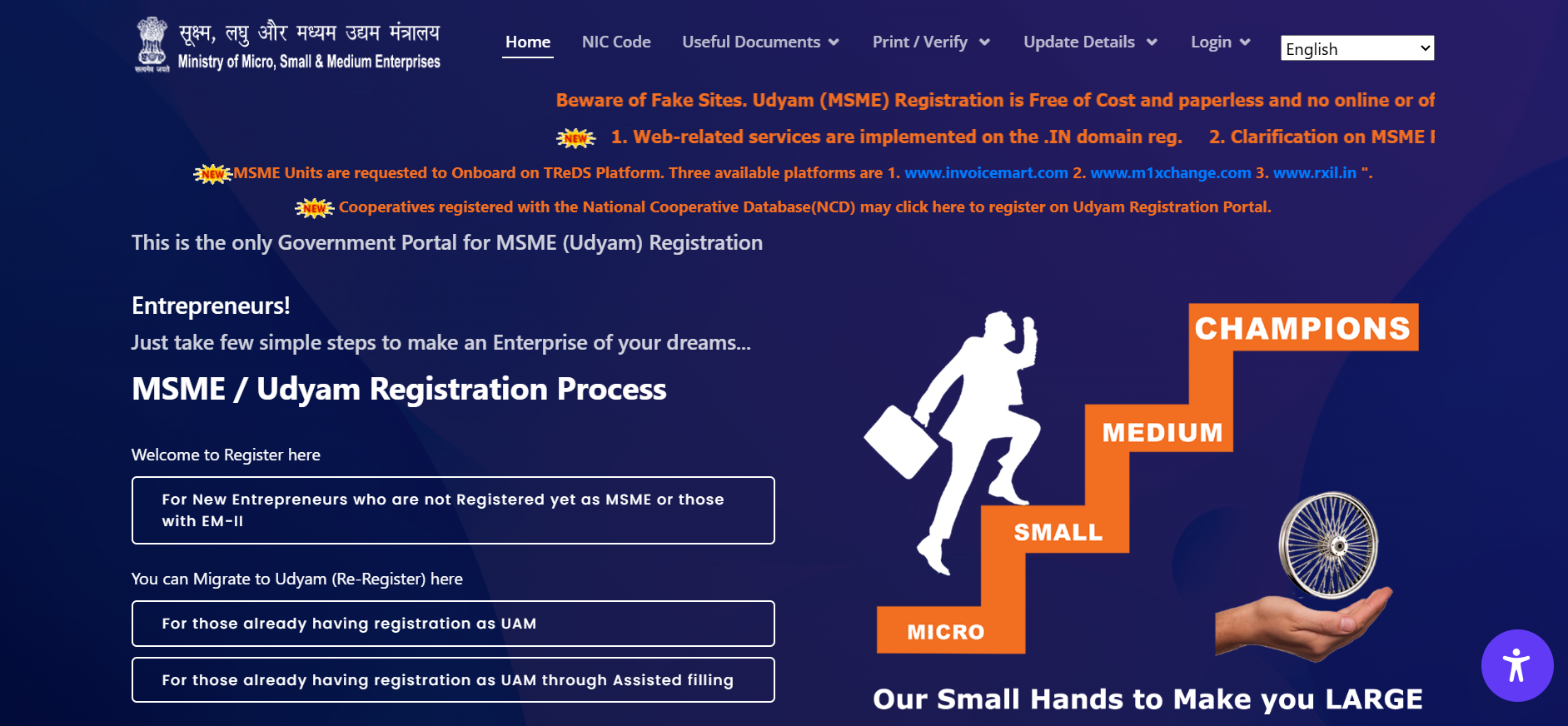
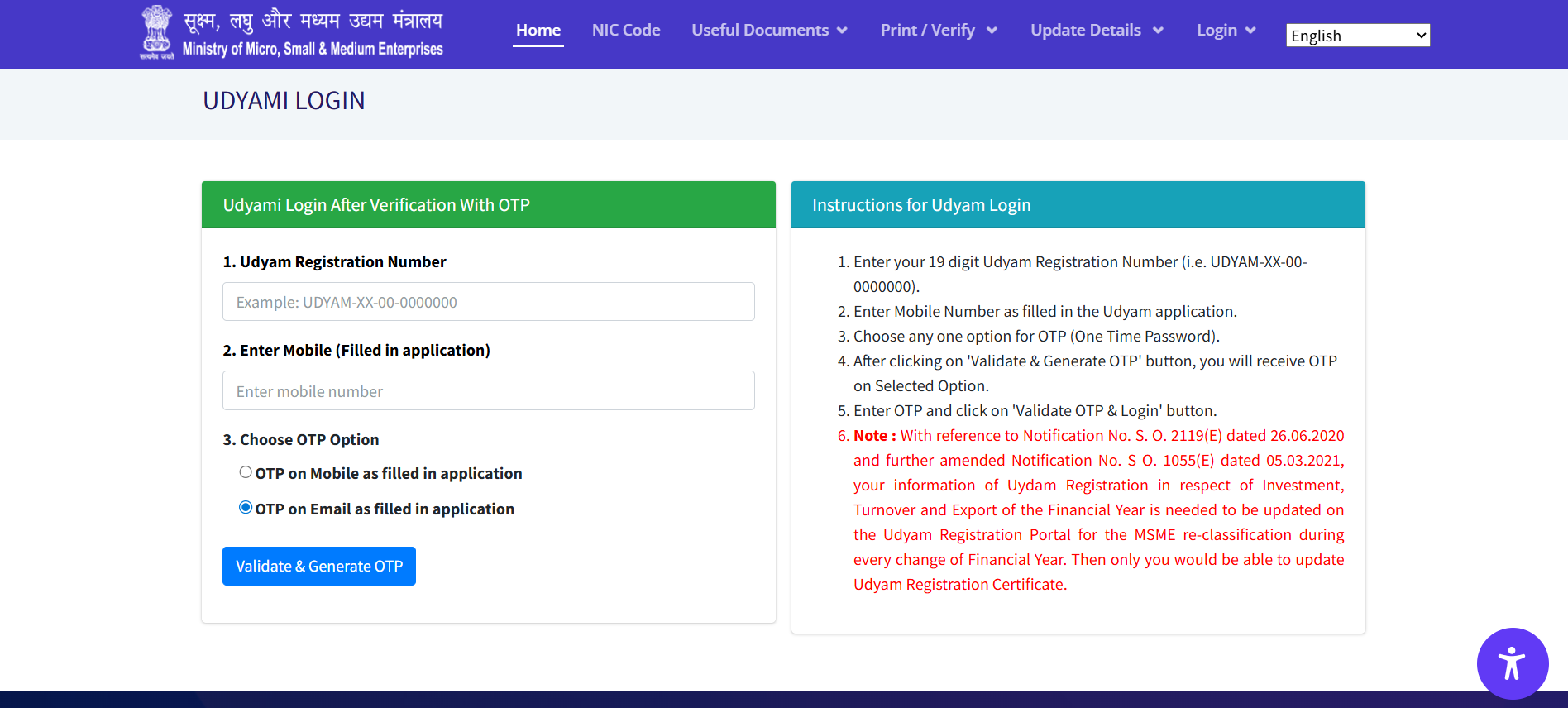
1. Visit the official portal: https://udyamregistration.gov.in
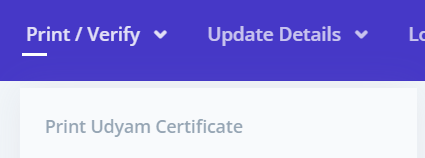
2. Click on “Print/Verify Certificate” in the top menu
3. Choose “Print Udyam Certificate” from the dropdown
4. Enter your Udyam Registration Number and the CAPTCHA code
5. Choose the OTP option (via Aadhaar-linked mobile) and click “Validate”
Troubleshooting Tip: If you do not receive the OTP, ensure your Aadhaar and mobile are correctly linked. For persistent issues, contact the Udyam helpline at champions[at]gov[dot]in. - Downloading and Saving the Certificate
1. Your certificate will appear on the screen
2. Click “Print” or “Download PDF”
3. Save it on your system and email it to yourself for backup
4. Keep a printed copy in your business compliance folder
Did You Know? The MSME certificate has no expiry, but you should update your business details if any change occurs.
Need help with MSME registration? Read our guide on Udyam registration process → MSME Registration Process Explained
Troubleshooting Common Issues When Downloading Your MSME Certificate
While downloading your MSME certificate from the Udyam portal is designed to be hassle-free, technical hiccups or data mismatches can occasionally stand in the way. Don’t worry, most issues can be resolved quickly with the right guidance. Here’s how to troubleshoot the most common problems effectively.
Common Download Errors and What They Mean
Users often report errors that seem confusing at first but are easily explained. The key is to identify the type of error:
- “No Record Found”: This usually occurs when the Udyam Registration Number entered is incorrect or incomplete.
- Invalid OTP or No OTP Received: Happens when the Aadhaar-linked mobile number has changed or isn’t active.
- CAPTCHA Not Working: The portal’s CAPTCHA may not load properly due to an outdated browser or cache issues.
- Server Downtime or Page Not Loading: The Udyam portal occasionally undergoes maintenance, especially during peak hours.
Tip: Always use updated browsers like Google Chrome or Mozilla Firefox. Clear your cache and cookies before attempting again.
Fixing Login or OTP Verification Problems
If you’re stuck at the OTP or login stage, try these proven fixes:
- Double-check your Udyam Number for accuracy. It should be in the format UDYAM-XX-00-0000000.
- Ensure your Aadhaar-linked mobile is active and capable of receiving SMS.
- Switch devices if one doesn’t work; desktop/laptop is more stable than mobile.
- Clear browser cache and disable extensions like ad blockers or pop-up suppressors.
- Try using an Incognito window, which often bypasses stored cache conflicts.
Best Practice: Log in during non-peak hours (early morning or late evening) to avoid server load issues.
Many entrepreneurs miss out on government schemes simply because they haven’t downloaded or updated their MSME certificate. It’s a small step that unlocks major advantages, like easier loan approvals and priority in public procurement.
How to Get Help from Official Support
If the issue persists despite these steps, reach out to the official support channels. They are responsive and regularly assist users with technical or registration-related issues:
- Email Support: champions@gov.in
- Toll-Free Helpline: 1800‑180‑6763
- Alternate Contact: 011‑23061574
- Grievance Portal: Visit the CHAMPIONS Portal for issue tracking and escalation
Expert Tip: Save a screenshot of your error message. It helps support teams identify the exact issue faster.
How to Verify and Use Your MSME Certificate
Once you’ve successfully downloaded your MSME certificate, your next step is to verify its authenticity and understand how to use it to claim the benefits available to registered MSMEs. Many entrepreneurs overlook this step, but it’s essential to ensure your registration is active, accurate, and fully utilized for business growth.
How to Verify Your MSME Certificate Online
Verifying your MSME (Udyam) certificate confirms that your registration is valid and up to date. This verification is often required when applying for loans, participating in tenders, or claiming government subsidies.
Follow these steps to verify your MSME certificate:
- Go to the official Udyam Registration Portal.
- Hover over the “Print/Verify” tab in the top navigation.
- Click on “Verify Udyam Registration Number.”
- Enter your 19-digit Udyam Number (e.g., UDYAM-MH-12-0001234).
- Complete the CAPTCHA and hit “Verify.”
If valid, the system will display:
- Legal name of your business
- PAN and Aadhaar verification status
- Type of enterprise (Micro, Small, Medium)
- Date of registration and activity details
Why this matters: Verification reassures lenders, government departments, and suppliers that your MSME registration is authentic and currently active.
How to Use Your MSME Certificate for Business Benefits?
Your MSME certificate isn’t just a document; it’s a gateway to financial incentives and growth opportunities. Here’s how you can make the most of it:
Loan Applications: Submit it when applying for MSME loans to access priority sector lending, faster approvals, and lower interest rates.
Government Tenders: Get exemptions from EMD (Earnest Money Deposit), benefit from price preference, and easier qualification criteria.
Subsidies & Incentives: Leverage it to apply for state and central schemes offering capital subsidies, marketing assistance, and skill development support.
Utility & Legal Benefits:
- Claim concessions on electricity bills
- Receive reimbursement on patent registration
- Protect your payments with the 45-day MSMED Act rule that penalises buyers for delayed settlements
Pro Tip: Always attach a soft or printed copy of your certificate when applying for government programmes, tenders, or loans; it speeds up approvals and establishes credibility.
How to Update or Renew Your MSME Certificate?
While your MSME certificate doesn’t expire, it’s essential to keep it updated to avoid discrepancies and ineligibility for benefits. Here’s how:
- Visit the Udyam portal at udyamregistration.gov.in.
- Select “Update Udyam Registration” from the menu.
- Enter your Udyam number and complete OTP verification using your Aadhaar-linked mobile.
- Modify details such as PAN, turnover, business activity, or address.
- Review and submit. The updated certificate can then be downloaded.
Note: Updates are especially important if your business moves into a new turnover bracket or adds new products/services.
Why Your MSME Certificate Is More Than Just a Document?
Your MSME certificate isn’t just a formal PDF; it’s a powerful enabler of credibility, compliance, and business growth. It shows that your enterprise is officially recognised by the Ministry of MSME and is eligible for a wide range of financial and operational advantages.
Here’s how this certificate adds strategic value beyond paperwork:
- Builds Trust with Lenders and Partners: Whether you’re applying for a loan or onboarding a corporate client, having your MSME certificate signals that your business meets government-defined standards.
- Qualifies You for Subsidies and Schemes: Government initiatives like CGTMSE, Aspire, and SFURTI require MSME recognition to access grants or collateral-free loans.
- Improves Procurement and Tender Eligibility: Many public sector contracts give preference to MSME-certified businesses, especially those from underrepresented segments.
- Supports Legal Protection and Faster Payments: The MSME certificate activates your rights under the MSMED Act, including protection from delayed payments.
In essence, this single document enhances your business’s access to credit, markets, and policy support, without requiring you to jump through hoops.
FlexiLoans offers collateral-free MSME loans with a quick, paperless process. Once your MSME certificate is ready, you’re just a step away from accessing the right financial support.
FAQs
An MSME certificate is an official recognition by the Government of India that classifies your business as a micro, small, or medium enterprise. It enables access to financial aid, subsidies, tender participation, and legal protections.
You can download it from the official Udyam portal using your 19-digit registration number and Aadhaar-linked mobile. The certificate is available instantly after OTP verification.
Yes, both manufacturing and service sector businesses, including eligible retail and wholesale traders, can register under MSME and obtain the certificate.
Errors such as “No Record Found” usually indicate incorrect details. Double-check your registration number and ensure your Aadhaar mobile number is active for OTP verification.
Yes, updates like business name, activity type, or contact details can be made online through the “Update Udyam Registration” option on the Udyam portal.
No, it doesn’t expire. However, it’s recommended to update your certificate periodically to reflect accurate information for compliance and benefit eligibility.
You can access government subsidies, priority loan processing, electricity concessions, patent cost reductions, and delayed payment protection under the MSMED Act.
Glossary of Key Terms
| Term | Definition |
| MSME | Micro, Small and Medium Enterprises – businesses classified based on investment and turnover as per the MSMED Act. |
| Udyam Registration | The official government registration for MSMEs under the Ministry of MSME, done via the Udyam portal. |
| MSME Certificate | A digitally issued certificate confirming MSME registration, used for accessing government benefits. |
| Aadhaar | A 12-digit unique identification number issued by UIDAI, essential for MSME certificate download and authentication. |
| OTP | One-Time Password – a temporary code sent to your registered mobile number for verification on the Udyam portal. |
| Udyam Portal | The official platform (https://udyamregistration.gov.in)for MSME registration, certificate download, and updates. |
| CAPTCHA | A security feature used on websites to verify that the user is human before accessing services. |
| MSMED Act | The Micro, Small and Medium Enterprises Development Act, 2006 – legal framework supporting MSMEs in India. |